Cloud Computing, Unit 3
Cloud Computing Unit 3 handwritten notes
- 19 pages
- 7.8 MB
- Handwritten by Anubhav Goel
YouTube's privacy-enhanced player. YouTube's privacy policy applies when you play the video.
Watch on YouTube(opens in a new tab)Unit 3 of Cloud Computing answers three questions: how is a cloud built, who can use it, and what exactly does a provider sell? This lesson walks through the unit in the same order as the handwritten notes, starting with the four-layer architecture and ending with how providers charge for what you use.
Below the video you'll find a written walkthrough of each topic, the key terms worth memorising, and practice questions with answers you can reveal. If you are revising the night before an exam, start with the revision checklist. If a topic feels unfamiliar, watch that part of the lesson first.
Editorial draft
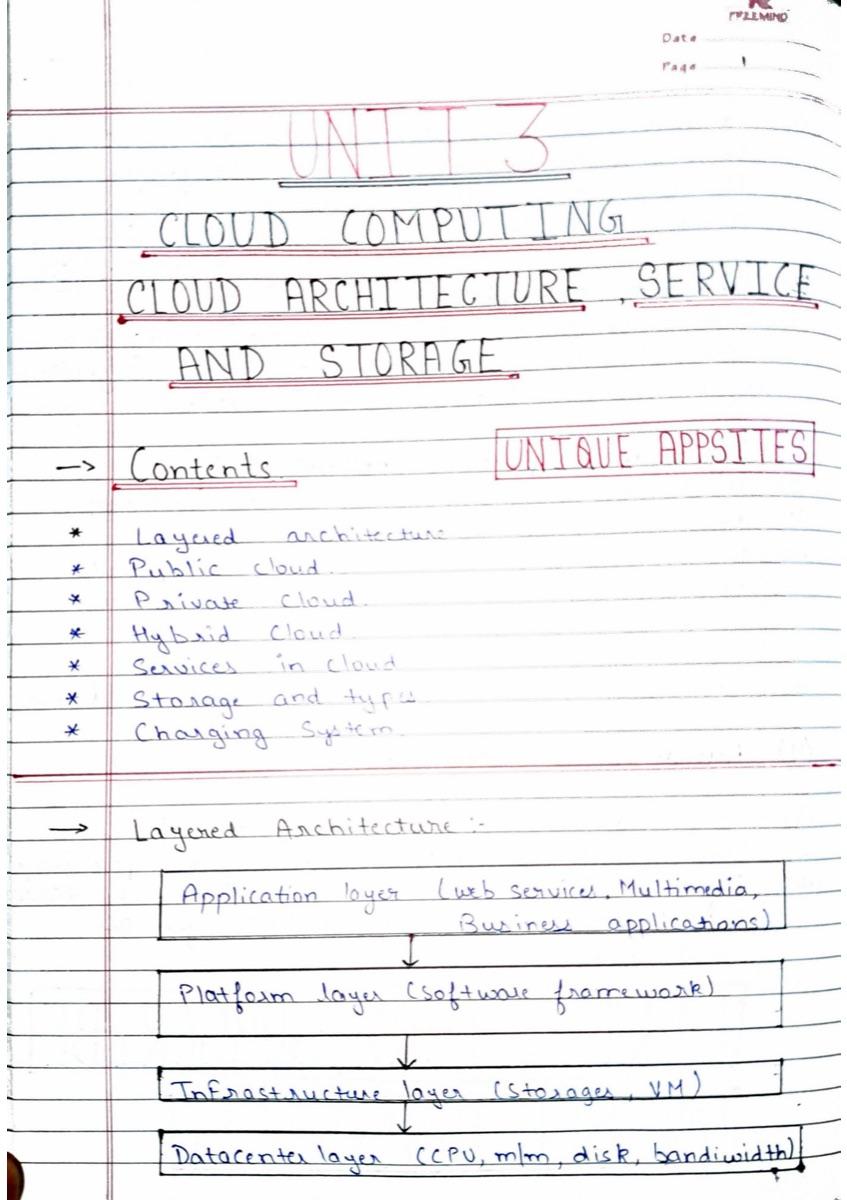
A cloud is easier to understand as a stack of four layers. Each layer uses the one beneath it and offers something more useful to the one above.
At the bottom, the datacenter layer is the physical hardware: servers, routers, switches, power supply and cooling. It supplies raw CPU, memory, disk and bandwidth. Above it, the infrastructure layer uses virtualization software such as Xen, KVM or VMware to split those physical resources into virtual machines and virtual storage that can be handed out on demand. This is the core of a cloud: resources are provisioned dynamically instead of being tied to one machine.
The platform layer runs on those virtual machines and provides an operating system and software frameworks, so developers can deploy applications without setting up servers. At the top, the application layer is what cloud users actually touch: web services, multimedia and business applications delivered as they need them. The top three layers line up with the three service models later in the unit: SaaS, PaaS and IaaS.
In a public cloud, a provider makes infrastructure and computing resources available to the general public over a public network such as the internet. Many customers share the same pool of hardware, and each uses only what it needs. Enterprises often move commodity workloads to public providers instead of running the hardware themselves.
Two common misunderstandings are worth clearing up for the exam. "Public" does not mean free: a public cloud can be free or inexpensive, but usually you pay for what you use. And "public" does not mean your data is visible to everyone: providers give each customer access controls.
Typical public cloud workloads include public-facing websites, wikis and blogs, batch-processing jobs and data-intensive workloads. Public clouds offer resource pooling, self-service, usage accounting, elasticity and multi-tenancy.
A private cloud is deployed for one organization, traditionally inside the company's firewall on servers it controls. It keeps cloud-style benefits such as on-demand capacity, self-service provisioning and service-based access, while giving the organization tighter control over security, resilience and who is allowed in.
The trade-off is cost and scale. Because the organization owns the hardware, it loses true pay-per-use pricing, has to size its hardware for peak load, and carries the full operating cost. A private cloud makes sense when control and security requirements justify that cost.
The notes describe three variants: a shared private cloud, where business units share capacity and are charged by usage; a dedicated private cloud, with its own catalogue of services provisioned on demand; and a dynamic private cloud, where workloads can move between shared and dedicated resources.
A hybrid cloud combines public and private clouds and uses them at the same time. A common pattern is to keep critical applications and sensitive data in the private cloud, while sending non-critical applications, or extra computing demand, to a public cloud.
Many organizations use a hybrid cloud as an intermediate step: an on-ramp from their existing IT environment into the cloud. It aims to combine the scale and convenience of a public cloud with the control and reliability of a private one. The lesson's diagram also shows a community cloud, which several organizations with shared requirements use together.
| Aspect | Public cloud | Private cloud | Hybrid cloud |
|---|---|---|---|
| Who uses it | The general public, many tenants | One organization | One organization, across both |
| Where it runs | Provider's data centers | Inside the organization's firewall | Both, connected together |
| Cost | Pay for what you use | Organization bears the full cost | A mix of both |
| Main strength | Scale and low cost | Control and security | Balance of both |
| Main limitation | Less control | Expensive and less scalable | Complex to manage |
Cloud providers sell their layers as services. The difference between the three service models is how much the provider manages for you.
Infrastructure as a Service (IaaS), sometimes called Hardware as a Service, lets an organization outsource storage, servers and networking. You rent virtual machines and pay per use, often billed hourly, daily or monthly, and you still install and manage the operating system and applications. Capacity can be changed within minutes instead of buying hardware. Amazon EC2 and Amazon S3 are well-known examples.
Platform as a Service (PaaS) provides a ready platform to develop, run and manage applications: operating system, server software, database, storage and development tools. You deploy your code and the provider handles the infrastructure underneath. Examples include Google App Engine and Microsoft Azure. The main risk is getting locked into one provider's platform.
Software as a Service (SaaS) is a complete application hosted on the provider's servers and used over the internet, usually in a browser. Web email such as Gmail is the classic example. SaaS comes in two broad categories: line-of-business services sold to companies on subscription, such as CRM and supply-chain tools, and customer-oriented services offered to the public, sometimes free and supported by advertising.
| Model | You manage | Provider manages | Example |
|---|---|---|---|
| IaaS | Operating system, runtime, applications and data | Physical servers, storage, networking and virtualization | Amazon EC2 |
| PaaS | Your application code and data | Infrastructure, operating system, runtime and middleware | Google App Engine |
| SaaS | Your account settings and data | The whole application and everything beneath it | Gmail |
The notes also list the problems architects have to plan for when designing a cloud. They are worth knowing as a short-answer list.
Cloud storage means keeping data online in the cloud, where it is stored on, and accessible from, many distributed and connected resources. It offers better accessibility and reliability, quick deployment, strong protection for backup, archiving and disaster recovery, and lower overall cost, because you don't buy and maintain your own storage hardware.
There are four types. Personal cloud storage, also called mobile cloud storage, syncs and shares one person's data across devices; Apple iCloud is an example. In public cloud storage, the enterprise and the storage provider are separate and the provider fully manages the storage. In private cloud storage, the provider's infrastructure is integrated into the enterprise's own data center, which helps with security and performance concerns. Hybrid cloud storage combines public and private storage.
Cloud providers mainly use two charging models. In the utility model you pay per use, much like an electricity bill: the more compute or storage you consume, the more you pay. In the subscription model you pay a time-based fee, for example every month, for access to a service.
The lesson ends with the challenges providers themselves face: protecting against data corruption, keeping logical security strong, making data work across different systems, and handling software vulnerabilities and breaches.
Application layer, platform layer, infrastructure layer and datacenter layer.
Neither. Public clouds can be free or low-cost but usually charge for usage, and providers give each customer access controls so their data stays private.
When control, security and restricted access matter more than cost and elastic scale, for example for sensitive data or strict compliance requirements.
The customer. The provider manages the physical hardware and virtualization; the customer installs and maintains the operating system and applications.
IaaS: Amazon EC2. PaaS: Google App Engine. SaaS: Gmail.
The utility model charges per use, like electricity. The subscription model charges a fixed, time-based fee for access.
Cloud Computing, Unit 3
Cloud Computing, Unit 3
An exam-day checklist for Cloud Computing Unit 3: architecture layers, deployment models, IaaS, PaaS and SaaS, storage types and charging models, with comparison tables and a self-test.
14 checklist items, 5 self-test questions
Check your current syllabus
Video: “Cloud Computing Unit 3 Full Explanation | KCS-713 | AKTU | Unique AppSites” by Anubhav Goel on the Unique AppSites YouTube channel(opens in a new tab), uploaded 27 Nov 2022.